Endpoints
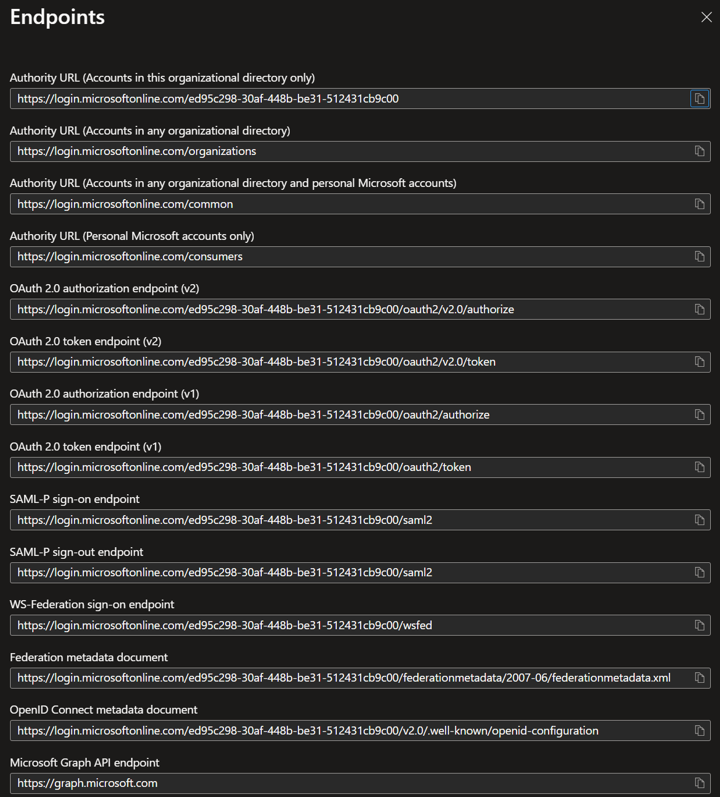
On the Endpoints tab, there are two URLs ready to copy, which we will need in the Infoport configuration manager.
The first of them is „Authority URL (Accounts in this organizational directory only)“ and looks like this, for example: https://login.microsoftonline.com/ed95c298-30af-448b-be31-512431cb9c00.
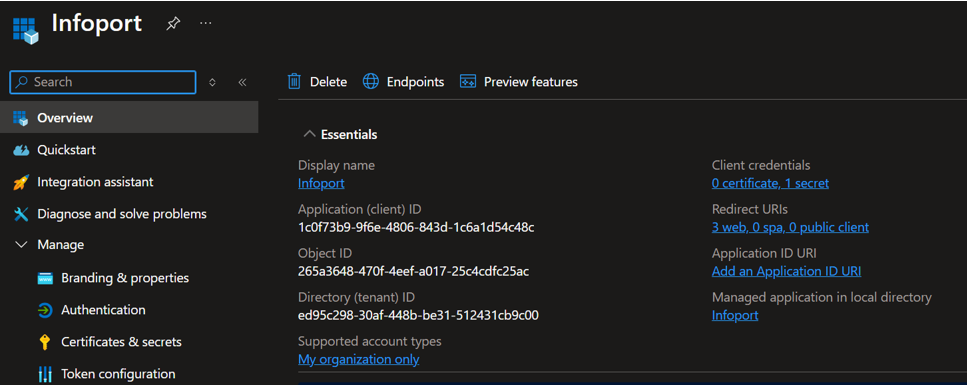
The server URL is usually the same, after the slash is the „Directory (tenant) ID“ of the registered application. We will fill in this value in the Infoport configuration manager under the „Server Realm“ field.
The second one is the „OpenID Connect metadata document“, it looks like this for example: „https://login.microsoftonline.com/ed95c298-30af-448b-be31-512431cb9c00/v2.0/.well-known/openid-configuration“ with the path again starting with the „Directory (tenant) ID“ value and the suffix usually being „/v2.0/.well-known/openid-configuration“.
This information will be entered in Infoport under the „Metadata“ field.