Infoport Connection Settings
In this section, we configure the portal's access to the database with its metadata. (We created it in step 3.4.8.) It is necessary to have a prepared database user with permissions for reading/writing/creating DB objects.
If an MSSQL database with integrated security is used, it is not necessary to fill in a UserId or Password. However, it is necessary to have an established user in the database, under which the portal (and therefore also EA) is run.
InfoportConnection_MySql": "Server=127.0.0.1;port=3306;Database=Data;Uid=Admin;Pwd=xxxxx;"
- DBMS: The parameter name must be the same (InfoportConnection), suffix of this parameter differs according to the used db: _MySQL / _SQLServer / _Oracle / etc..
- Server: Name or IP address of the server.
- Port: The port on which the DB is listening (optional parameter).
- Database: The name of the database in which the portal metadata is stored.
- Name: The name of the database user.
- Password: Database user password.
- Timeout: Time for which the query takes place. In a large database, this may take longer than a minute, so set a minimum of 90 for large databases. ("Timeout": 90)
- Maximum Dcom Instances: 2 – MaximumDcomInstances indicates the maximum number of DCOMs for each running EaInfoport server. The default value (if nothing specified) is 2. If a user does not wish to terminate DCOMs, then he/she should set a very high number (for example 99). If the maximum number of DCOMs is exceeded, the server will kill them all and start a fresh one. The check is done at startup, as well as at regular intervals set in Background / Seconds.
- If DCOM is turned off in the task manager, EAInfoportT3 will turn it back on in a moment
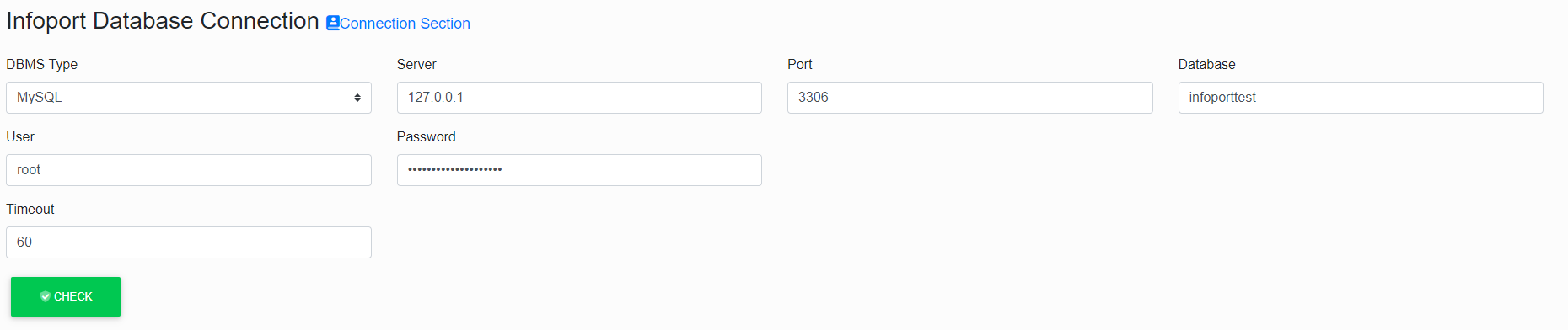
Fill in the database schema (this is not the Enterprise Architect repository schema, but the schema for EAInfoport metadata). The database schema must be empty and only for EAInfoportT3 purposes. After filling in the appropriate tab, the user clicks the "Check" button, if the tab lights up red, any errors need to be corrected. If it lights up green, the tab has been filled in correctly.