# Notification Hour Job

<div class="pointer-container" id="bkmrk-%C2%A0"><div class="pointer anim is-page-editable"><div class="input-group inline block"><input id="bkmrk--2" placeholder="url" readonly="readonly" type="text"></input> <button class="button outline icon" data-clipboard-target="#pointer-url" title="Kopírovat odkaz" type="button"><svg class="svg-icon" data-icon="copy" role="presentation" viewbox="0 0 24 24" xmlns="http://www.w3.org/2000/svg"></svg></button></div><svg class="svg-icon" data-icon="edit" role="presentation" viewbox="0 0 24 24" xmlns="http://www.w3.org/2000/svg"></svg></div></div>The basic parameter for each job is information about the frequency with which it will run.   
It is possible to set it to run every minute, or maybe just once a month.   
The syntax known as [CRON](https://en.wikipedia.org/wiki/Cron) is used for this and there are always five items in the configurator (*Minute, Hour, Day of the Month, Month and Day of the week*).

For each job it is also possible to set whether it should be run immediately after the application (server) start by checking the "***Run Immediately***" item.

[![day jov.png](https://doc.eainfoport.cz/uploads/images/gallery/2022-09/scaled-1680-/day-jov.png)](https://doc.eainfoport.cz/uploads/images/gallery/2022-09/day-jov.png)

This job has the task of sending the user an email notification about a change on the diagram.   
If it does not detect any change on the diagram, it does not send the notification.   
If it detects a change on the diagram, the job sends an email notification on the diagram with the change made.

- - - - - -

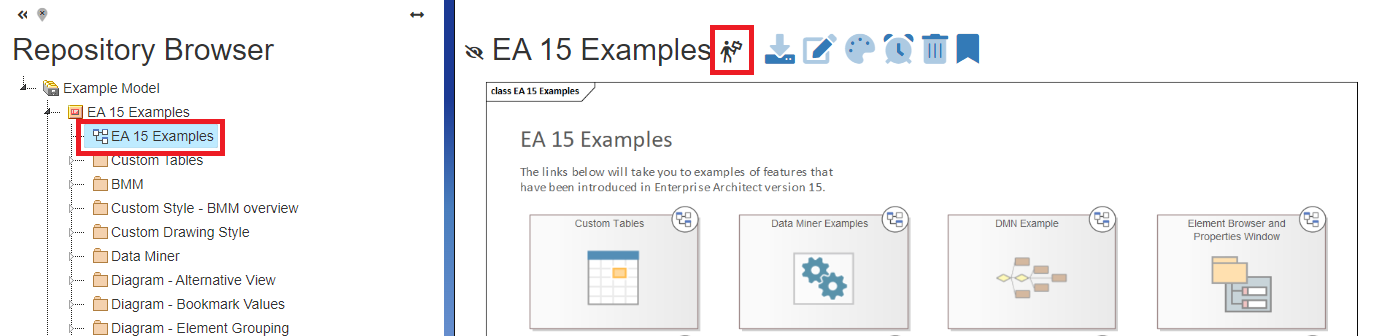
The user can see an "i*nformation bar*" icon on the diagram which, when clicked, informs what type of notification is set.

<div class="pointer-container" id="bkmrk-%C2%A0-0"><div class="pointer anim is-page-editable"><svg class="svg-icon" data-icon="link" role="presentation" viewbox="0 0 24 24" xmlns="http://www.w3.org/2000/svg"></svg><div class="input-group inline block"><input id="bkmrk--3" placeholder="url" readonly="readonly" type="text"></input> <button class="button outline icon" data-clipboard-target="#pointer-url" title="Kopírovat odkaz" type="button"><svg class="svg-icon" data-icon="copy" role="presentation" viewbox="0 0 24 24" xmlns="http://www.w3.org/2000/svg"></svg></button></div><svg class="svg-icon" data-icon="edit" role="presentation" viewbox="0 0 24 24" xmlns="http://www.w3.org/2000/svg"></svg></div></div>[![tree information bar.png](https://doc.eainfoport.cz/uploads/images/gallery/2022-10/scaled-1680-/tree-information-bar.png)](https://doc.eainfoport.cz/uploads/images/gallery/2022-10/tree-information-bar.png)

To set up an hourly notification, the user must click on the icon [![hodina.png](https://doc.eainfoport.cz/uploads/images/gallery/2022-09/scaled-1680-/hodina.png)](https://doc.eainfoport.cz/uploads/images/gallery/2022-09/hodina.png)and when the icon changes the sending of the diagram is set.