Question & Answer
List of the most common questions and answers to them. Questions can relate technical, license, and methodology matters. You can find also tips & tricks here and anything else related to Enterprise Architect Information Portal.
- Can I have more than one personal licence registered?
- Problem with license key
- Search with Czech characters does not work
- Setting an Element Size in a Diagram
- The diagram image is too small
- Can I rename the EaInfoport.exe file?
- Inappropriate display of a detail
- Inappropriate display of the chart
- After editing, the change does not appear in the Enterprise Architect
- If an EA repository cannot be connected due to an incorrect EAP password (EAP file path, Username or Password is not valid)
- Migration error
- The “back” function is not supported by the browser
- User synchronisation against Enterprise Architect does not work
- How does an administrator log into Infoport for the first time?
- Unable to finish service due to mysql date in db
- Unable to view new models in Infoportal with basic permissions
- What happens if a user connects an EA repository to the infoportal and then migrates the database data?
- Why can't LDAP login/logout?
- What should I do if I have collations inconsistency in my database (MySQL, MariaDB)?
- What is the required EA schema to connect EA repository?
- Version 8.4.0.12 - Access to views
- Admin does not have automatic access to repositories
- InfoportLauncher can not install the version via "-Source file"
- Permissions for groups/users when using the “Direct Access URL” feature
- Default settings on the package
- Default settings and permission settings on package
- SSL communication settings for connecting EAInfoport and PostgreSQL database
- After installing EA Infoport 8.7.0.8956, the icons for creating access keys (permalinks) are not displayed
- Sorting artifacts and operations
- Error installing version 8.8.x "Could not load file or assembly"
- Error [ERR] Email 'xxx.yyy@xxxx.cz' is already taken
- [ERR] User 'xxx.yyy@xxxx.cz' had once existed and was deleted from the portal
- Micrsosoft database (sql sever 2014 and older) - Microsoft.Data.SqlClient.SqlException (0x80131904): Incorrect syntax near '$'.
- "Diagram is being re-generated" followed by a second error "System error"
- One user cannot log in to Infoport
- XFrame does not work
- Admin login via Active Directory
- Missing Repository Permissions During AD or OpenID Login
- Automatic login of Windows server
- What to do if you fail to install a new EA Infoport version and need to run the original version
- Automated permission setup for a user or group via DB
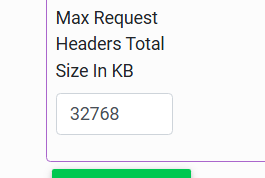
- HTTP header size limit setting
- How do all three options for generating "Url for access ..." differ
- Does the "KeyCloak" configuration section in appsettings.json support multiple redirect URLs?
- If the following message appears after starting Infoport ...
Can I have more than one personal licence registered?

Question
Can I have more than one personal licence registered?
Answer
Yes, if you follow the licensing rules, you can have any number of personal (or NP-EDU as well) licences registered.
Problem with license key
Question
What should I do if there is a problem with my license key?
Answer
- You need to delete the appsettings.json configuration file in the infoport installation folder, restart the server and run the basic localhost and reconfigure the application
- Or replace the license key in appsettings
Search with Czech characters does not work
Question
I don't see Czech characters in the full-text search. What is wrong?
Answer
You probably do not have the coalesce set correctly on the DB (database installation in which you have created EA repository).
Setting an Element Size in a Diagram
Question
After adding an element to a diagram, the element has the wrong size. What to do?
Answer
In Enterprise Architect, click on Configure, then on Options. In the window that will open, click on Cloud and check the option Auto create Diagram Image and Image Map (each time a Diagram is saved).
Settings required for each project!

The diagram image is too small
Question
The diagram image that I see is too small. Why?
Answer
The diagram value must be set to 400% and the Image Memory Limit to 256 (Optimal Zoom Setting).
Can I rename the EaInfoport.exe file?
Question
Can I rename the EaInfoport.exe file?
Answer
No, InfoportLauncher would not be able to recognise the currently running version.
Inappropriate display of a detail
Question
What to do when I have troubles with displaying a detail?
Answer
In a dynamic detail, the width of the field must be set.
Inappropriate display of the chart
Question
What to do when I see the client’s chart displayed incorrectly, but it is correct in the portal?
Answer
If you see the client’s chart displayed incorrectly (distorted graphic), but it is correct in the server, it may be due to incorrectly installed MDG technology.
After editing, the change does not appear in the Enterprise Architect
Question
What to do when the change does not appear in Enterprise Architect after editing in the portal?
Answer
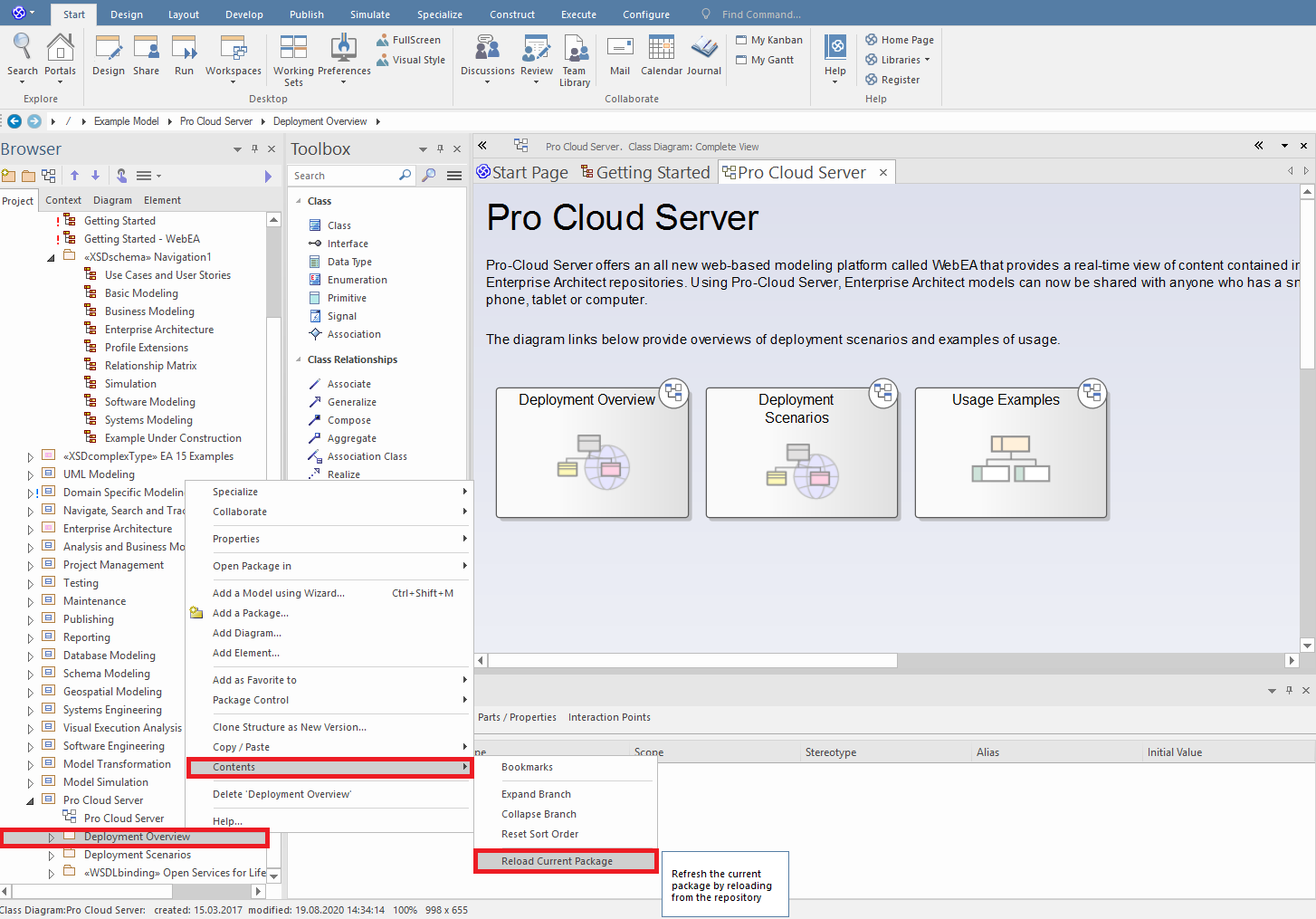
You need to right-click on “package” in Enterprise Architect. We click on “contents” and then choose “reload current package”. Thus the package will be restored and the change will appear in Enterprise Architect.
If an EA repository cannot be connected due to an incorrect EAP password (EAP file path, Username or Password is not valid)
Question
If, while connecting the EA repository, the system reports “Path to EAP file, Username or Password is not valid” in the configuration manager and you are sure that the name and path are correct, how to solve the problem?
Answer
- Check the username and password again – ideally copy the path to the clipboard and run it from the command line.
- Check if there is a space at the beginning or end of the password/username.
- Copy the EAP shortcut (or the entire EA Infoport directory) from the system folders to the root directory (e.g. to C:\EAInfoport). Note that the system folders to which Windows restricts access include, for example, Program Files and Program Files (x86)
Migration error
Question
What to do if the following error occurs during migration?
(Column 'AspNetUsers.Id' is not of same collation as referencing column 'VisitedDetails.UserId' in foreign key 'FK_VisitedDetails_AspNetUsers_UserId'.
Could not create constraint or index. See previous errors.)
Answer
Make sure that the database table and the database itself have the same collation.
The “back” function is not supported by the browser
Question
What should I do if I want to use the “back” function in the browser from the portal?
Answer
When switching between repositories or a portal, the “back” function is not supported by the browser.
User synchronisation against Enterprise Architect does not work
Question
What should I do if my user does not synchronise against Enterprise Architect?
Answer
Make sure that the user has access to the repository.
The portal administrator is not automatically taken as a repository user and has to be exactly assigned to the repository; otherwise, it will not be connected to Enterprise Architect.
How does an administrator log into Infoport for the first time?
Question
How does an administrator log into Infoport for the first time?
Answer
The administrator logs in for the first time using the login credentials:
Username: admin
Password: P@ssw0rd
We recommend changing your password after the first login!
Unable to finish service due to mysql date in db
Question
What to do in case of error Unable to convert MySQL date/time to System.DateTime, set AllowZeroDateTime=True or ConvertZeroDateTime=True in the connection string. See https://mysqlconnector.net/connection-options/ ?
Answer
If this error occurs, it should be enough to put at the end of the connection string ConvertZeroDateTime=True;.
Unable to view new models in Infoportal with basic permissions
Question
I have connected the repository to the Infoportal. In Enterprise Architect I created a new root node (new model), but unfortunately in Infoportal the user with basic permissions cannot see it. How to solve this problem?
Answer
In version 7.x, the user is unfortunately forced to delete the repository and recreate it.
As of version 8.x, a button has been added to the repository edit for everyone, which will reset the permissions and thus create a default permission on the newly created model.
Users who own Medium Business Edition and above also have the option to manually set this default permission on behalf of the repository admin or model owner via the Permissions tab in the tree.
What happens if a user connects an EA repository to the infoportal and then migrates the database data?
Question
What happens if a user connects an EA repository to the infoportal and then migrates the database data?
Answer
The InfoPortal will not be able to properly evaluate its own permissions on packages.
A new button has been added to repository editing that will reset all permission settings on packages and resolve the repository migration issue.
Why can't LDAP login/logout?
Question
Why can't LDAP login/logout?
Answer
Since version 8.0.1.x, we have normalized Windows Authentication to .Net 6 libraries.
Windows user who is not in LDAP will not be able to log in. Only users authenticated against LDAP and without the ability to log out will automatically log in.
For non-LDAP login, the administrator will need to set the AutomaticLogin entry in the LDAP section of appsettings.json to false and restart Infoport. This will remove the automatic login option, but the Login Page will be able to authenticate a user who is not in LDAP, but only in the database.
What should I do if I have collations inconsistency in my database (MySQL, MariaDB)?
Question
What should I do if I have collations inconsistency in my database (MySQL, MariaDB)?
Answer
The following applies only to MySQL and MariaDB:
As of version 8.2, schema collation must be consistent with the collation of individual tables and columns or Infoport will not allow migration. The database admin must unify the collation on the schema.
To display collation on columns, use query:
SELECT DISTINCT COLLATION_NAME
FROM information_schema.columns
WHERE TABLE_SCHEMA = 'schemaName'AND TABLE_NAME <> '__EfMigrationsHistory' AND COLLATION_NAME IS NOT null
To display collation on tables, use query:
SELECT DISTINCT TABLE_COLLATION
FROM information_schema.`TABLES`
WHERE TABLE_SCHEMA = 'schemaName' AND TABLE_NAME <> '__EfMigrationsHistory'
To display collation on the schema, use query:
SELECT DEFAULT_COLLATION_NAME
FROM information_schema.SCHEMATA
WHERE SCHEMA_NAME = 'schemaName' AND TABLE_NAME <> '__EfMigrationsHistory'
To display tables, columns and their collation, use query:
SELECT TABLE_NAME, COLUMN_NAME, COLLATION_NAME
FROM information_schema.columns
WHERE TABLE_SCHEMA = 'schemaName'
AND COLLATION_NAME IS NOT NULL
AND TABLE_NAME <> '__EfMigrationsHistory'
GROUP BY TABLE_NAME, COLUMN_NAME, COLLATION_NAME
Please reunite the collation and restart Infoport.
You can use the following scripts for unification:
For each table:
SELECT CONCAT('ALTER TABLE `', TABLE_NAME,
'` CONVERT TO CHARACTER SET utf8mb4 COLLATE utf8mb4_unicode_ci;')
AS 'USE `DATABASE_NAME`;'
FROM INFORMATION_SCHEMA.TABLES
WHERE TABLE_SCHEMA = 'DATABASE_NAME'
AND TABLE_TYPE LIKE 'BASE TABLE'
For each column:
SELECT CONCAT('ALTER TABLE `', TABLE_NAME, '` MODIFY COLUMN `', COLUMN_NAME,'` ',
DATA_TYPE, IF(CHARACTER_MAXIMUM_LENGTH IS NULL
OR DATA_TYPE LIKE 'longtext', '', CONCAT('(', CHARACTER_MAXIMUM_LENGTH,
')')
), ' COLLATE utf8mb4_unicode_ci;') AS 'USE `DATABASE_NAME`;'
FROM INFORMATION_SCHEMA.COLUMNS
WHERE TABLE_SCHEMA = 'DATABASE_NAME'
AND (SELECT INFORMATION_SCHEMA.TABLES.TABLE_TYPE
FROM INFORMATION_SCHEMA.TABLES
WHERE INFORMATION_SCHEMA.TABLES.TABLE_SCHEMA =
INFORMATION_SCHEMA.COLUMNS.TABLE_SCHEMA
AND INFORMATION_SCHEMA.TABLES.TABLE_NAME =
INFORMATION_SCHEMA.COLUMNS.TABLE_NAME
LIMIT 1) LIKE 'BASE TABLE'
AND DATA_TYPE IN ( 'char', 'varchar' ) /* include other types if necessary */
Please contact the helpdesk for more information https://www.dphelpdesk.cz/ .
What is the required EA schema to connect EA repository?

Question:
What is the required EA schema to connect EA repository?
Answer:
MySQL database server with a schema of at least EASchema_1220_MySQL.sql, our recommendation EASchema_1558_MySQL.sql. (Note: EASchema_851_MySQL.sql does not work).
Version 8.4.0.12 - Access to views
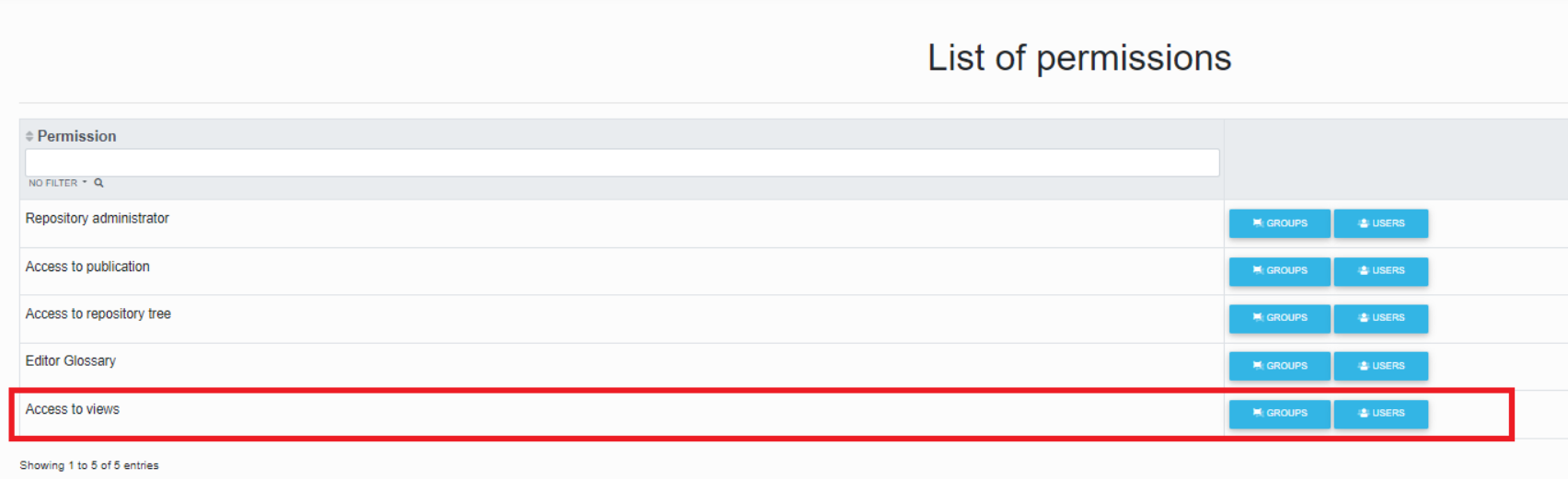
In version 8.4.0.12, a new permission for views (Views) is added. For users/groups with permissions on the tree, you must also add permissions on views, otherwise the view will not be displayed.
Version 8.4.1.1 there is no need to add settings. A user authorized to the repositories tree also has access to views.
Admin does not have automatic access to repositories
Question
Since version 8.5.0.8563 admin can't get into the repositories?
Answer
Now, because of audit reasons, the admin (portal administrator) is not automatically assigned access to the repository. After clicking the arrow in the top left corner, he only sees the list of created repositories.
If necessary, it is necessary to set permissions to the required repositories via "Portal Management">"User Management">"User List".
InfoportLauncher can not install the version via "-Source file"
Question:
InfoportLauncher can not install version via "-Source file", in cmd it pops up "Update site is not available"

Answer:
There must be no zip in the InfoportLauncher folder other than the Infoport zip, the launcher scans all .zip files looking for the .zip to install.
Permissions for groups/users when using the “Direct Access URL” feature
Question
How are permissions applied to groups/users when using the "Direct Access URL" feature?
Answer
The "direct access URL" functionality is designed for the very purpose of allowing anyone who has the link to get to the published link. That is why the link includes a generated security key. If you want to authenticate the reader, do not use this functionality, but use the "Copy url" functionality (careful, this is not the same as copying the link in the browser!)
This is used, for example, where authentication + authorization is handled in a different way (Confluence, Sharepoint, some documents, etc.) or if you simply need to make sure that (for example) everyone who clicks on the diagram actually gets to see it.
However, a diagram published in this way will only take the reader to the detail of the elements placed on the diagram, if they want to click further, for example via a hyperlink, it will already require a login.
A user can only create a url for direct access if he/she has rights to it.
Default settings on the package
Question
What happens if the default settings on a package are not checked?
Answer
If there is no default setting, i.e. the setting is taken from the parent root package, then the repository is not visible by default, or reading is not allowed.
Default settings and permission settings on package
Question
How do the default and permission settings work on package?
Answer
The permission settings on package are shown in the table below:
| Parent | Default | Group | Personal | Result |
| no | - | - | - | no |
| no | no | - | - | no |
| no | yes | - | - | yes |
| no | x | - | no | no |
| no | x | - | yes | yes |
| no | x | no | - | no |
| no | x | yes | - | yes |
| no | x | no | no | no |
| no | x | no | yes | yes |
| no | x | yes | no (not possible)** | yes |
| no | x | yes | yes | yes |
| yes | - | - | - | yes |
| yes | no | - | - | no |
| yes | yes | - | - | yes |
| yes | x | - | no | no |
| yes | x | - | yes | yes |
| yes | x | no | - | no |
| yes | x | yes | - | yes |
| yes | x | no | no | no |
| yes | x | no | yes (not possible)** | no |
| yes | x | yes | no | no |
| yes | x | yes | yes | yes |
* If you set permissions on a group, the settings are automatically checked on the user who is a member of the group.
- not specified
x value does not matter
The default setting is inherited from the parent package.
If there is no default setting at all (only for newly created Roots), the repository is not visible by default, or reading is not allowed.
Admin has access to all packages, regardless of the settings.
The evaluation of rights on a child package does not take into account how the rights were evaluated on the parent package; only the result of the evaluation on the parent (no/yes) enters into the decision.
Further recommended information about permissions: Permissions in case a user is a member of two groups with different settings.
SSL communication settings for connecting EAInfoport and PostgreSQL database
Question

How to set up SSL communication for connecting EAInforport and PostgreSQL database?
Answer
The following procedure is verified on a PostgreSQL 13 and Infoport 8.7.x installation.
A detailed description of the database setup is provided directly in the current documentation https://www.postgresql.org/docs/current/ssl-tcp.html which we recommend to study carefully. In addition, https://methoddev.com/blog/postgresql-windows-encrypted-connection-ssl provides a step-by-step procedure on how to configure the database in practice.
To verify that the communication is secure, it is advisable to use the following sql query that can be run on the database:
SELECT application_name, datname, usename, ssl, client_addr
FROM pg_stat_ssl
INNER JOIN pg_stat_activity ON pg_stat_ssl.pid = pg_stat_activity.pid;
The result will show if the session (a specific application connection - e.g. EAInfoport) is secured by ssl. It is recommended to check this both before starting any changes to the settings and after they are completed.
EAInfoport settings are (for now - later will be part of Configuration Manager) done using the appsettings.json configuration file. Here you need to add the value "InfoportConnection_Npgsql" with ";ApplicationName=Infoport;SSL Mode=VerifyCA". This setting means that EAInfoport will require an ssl connection to the database, and will check that a trusted certificate exists.
Note: if the db server is set to require ssl (=reject connection without ssl) but the connection string of EAInfoport is set to ";SSL Mode=Disable", the EAInfoport log will show a message like "28000: pg_hba.conf rejects connection for host "x.x.x", user "xx", database "xx", SSL off".
EAInfoport version 7.x has not been developed or tested for ssl connections, but the following can be tested:
Since version 6 (.NET - not the database) the parameter variations for ssl have been changed (see also Security and Encryption | Npgsql Documentation)
Npgsql v6.0+:
Disable
Allow
Prefer (default)
Require
VerifyCA
VerifyFull
Npgsql pre-v6.0:
Disable (default)
Prefer
Require
For .NET version 2 (= for EAInfoport 7.x) it is possible to try ';SSL Mode=Prefer' as a parameter or add that I trust the certificate, i.e. ";SSL Mode=Prefer;Trust Server Certificate=true"
The last option is to replace Prefer with Require
After installing EA Infoport 8.7.0.8956, the icons for creating access keys (permalinks) are not displayed
In EaIfoport there is a new option to set users to "Public Key Publication Permissions".
After installing version 8.7.0, users who create permalinks must set the permissions otherwise they will lose this option.
Setting option:
Portal Management > User Management > Repositories > Select required permissions
Sorting artifacts and operations
Question
How to change the order of artifacts and operations so that they are not sorted alphabetically?
Answer
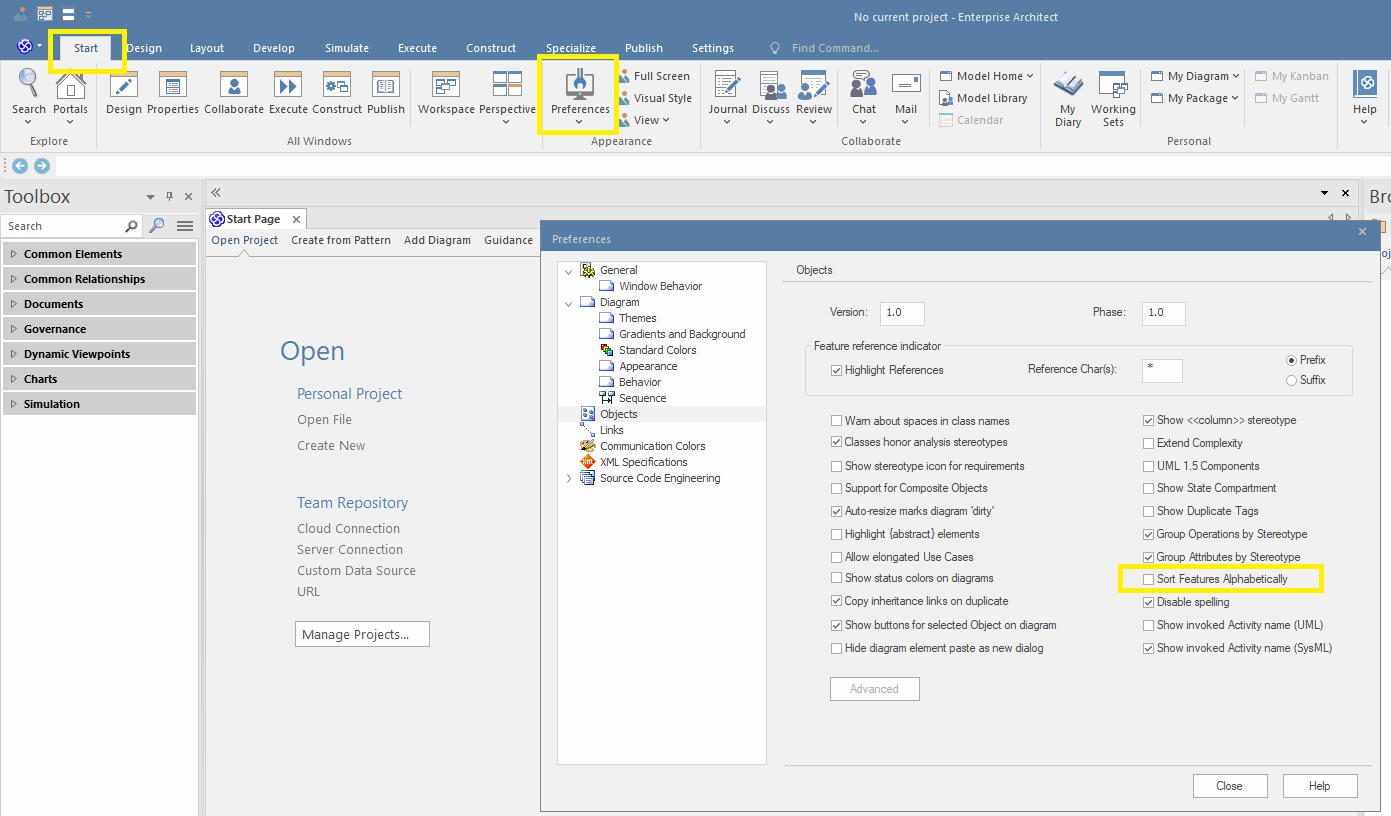
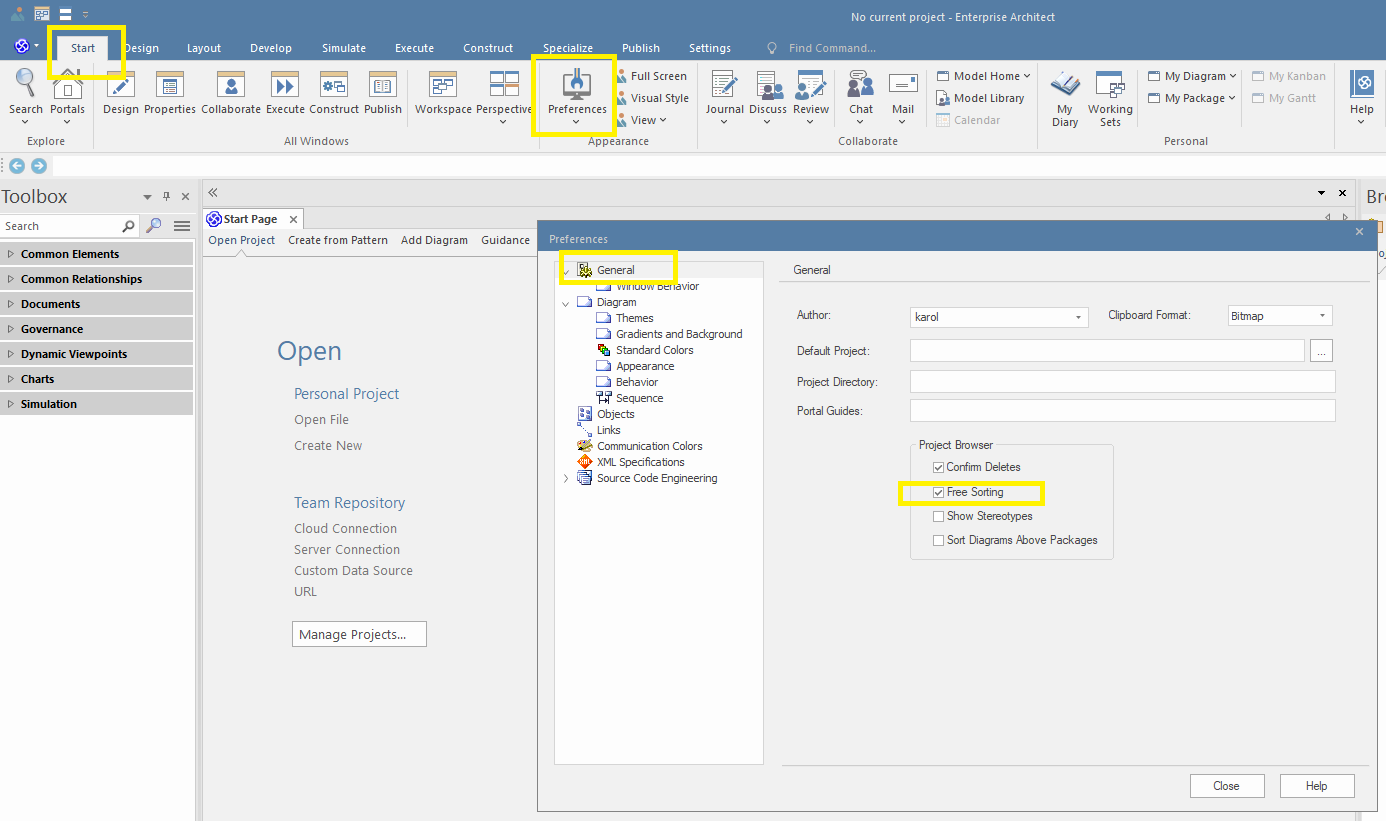
If you want EaInfoport to follow the order of attributes and operations as you define them (manually), it is necessary to disable ordering in EA, see below.
Error installing version 8.8.x "Could not load file or assembly"
Question
What if you get the following error when installing version 8.8.x?
Could not load file or assembly 'Serilog.Filters.Expressions, Version=2.1.0.0, ...
Answer
The error may occur when running version 8.8.x if version 7.x.x was once installed on the server.
You need to find the file "Serilog.Filters.Expressions.dll" in Infoport version 8.8.x and delete it.
Error [ERR] Email 'xxx.yyy@xxxx.cz' is already taken
What should be the correct administrator action if there is an entry in the log
[ERR] Email 'xxx.yyy@xxxx.cz' is already taken from AD synchronization?

The administrator should make sure that the email is entered correctly and is not duplicated (in Active Directory)
Error occurs if the user is manually modified e.g. changing the username in Infoport.
It is recommended to track the change and edit it in Activ Directory or Infoport.
Alternatively, the user can be deleted in the Infoport database, after synchronization with AD, the user is re-established in Infoport in the correct way.
[ERR] User 'xxx.yyy@xxxx.cz' had once existed and was deleted from the portal
What does it mean when the following error pops up?
[ERR] User 'xxx.yyy@xxxx.cz' had once existed and was deleted from the portal. If you need to restore him, contact the portal administrator please.
The error occurs if the user is deleted only in the Infoport and Active Directory is trying to synchronize the user.
We recommend deleting the user directly in the Infoport database.
Micrsosoft database (sql sever 2014 and older) - Microsoft.Data.SqlClient.SqlException (0x80131904): Incorrect syntax near '$'.
You have a Micrsosoft database (sql sever 2014 and older) and EaInfoport does not work correctly since version 8.8.0.9195 or you get the error message Microsoft.Data.SqlClient.SqlException (0x80131904): Incorrect syntax near '$'. ?
You need to install a newer version of Sql Sever see
https://learn.microsoft.com/en-us/ef/core/what-is-new/ef-core-8.0/breaking-changes#contains-in-linq-queries-may-stop-working-on-older-sql-server-versions
"Diagram is being re-generated" followed by a second error "System error"
When you try to display the diagram (image), two messages are displayed in turn. The first informative "Diagram is being regenerated" followed by the second error "System error"

If we look in the DevTool browser (F12) we can see the Console message that there are no rights to read the .png file (where the requested image is).
Furthermore, the Infoport log shows an entry about the inability to generate the image (typically reported by EA.Interop.dll / DCOM)
One of the causes may be a problem with access to the cache files, when something (failure, downtime, migration, etc.) causes the rights to the file caching the diagrams to be lost or locked by some process.
The files are available for reading (that's why most of them are displayed in Infoport), but as soon as they need to be regenerated (new diagram, change on diagram, etc.) it is not possible and the user gets an error in the browser. This is because when the Sparx DCOM is called, it failed to update the file on disk (in the cache).
The solution is to delete the directories that make up the \wwwroot\cache\* cache.
One user cannot log in to Infoport
What to do if one of the users cannot log in to Infoport?
We recommend logging in as an anonymous user and delete cookies.
XFrame does not work
What to do if your XFrame doesn't work?
Check the settings in Configuration Manager, the Active checkbox must be checked.
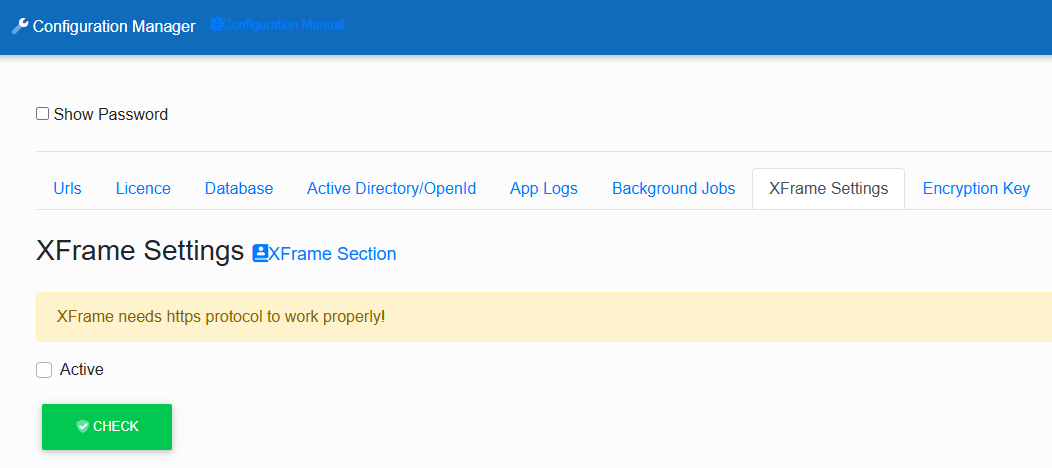
Admin login via Active Directory
When installing login via Active Directory, it is necessary to create the user "Admin" in AD, then turn off AD and log in to Infoport and set the user "Admin" as the portal administrator.
Missing Repository Permissions During AD or OpenID Login
Question
What to do if users have lost Repository permissions during login via AD or OpenID?
Answer
This situation may have occurred after installing new version 8.7.0.8956. Users may have lost Repository permissions during login via AD or OpenID. It is important to note that this most likely happened when a user had more than one Repository.
The fix is possible using a script that finds these users and restores their permissions. If the problem is confirmed, please contact us at https://www.dphelpdesk.cz/
Automatic login of Windows server
Edit: since Windows Server 2019, the following procedure applies (but Autolog still applies):
EA Infoport and some other tools only run if a user is logged into the server (i.e. they cannot be operated as a Windows service). This is because these tools work with the graphical layer, which is not available to system services.
This problem can be solved by setting up automatic login of a selected user to the server in several ways, see:
Option: User Management Applet
Full steps:
Disabling CTRL+ALT+DEL logon requirement
- Start
- Type 'Local Security Policy' (no quotes) and click on item matching this name
- Open 'Local Policies'
- Open 'Security Options'
- Locate Policy called 'Interactive logon: Do not require CTRL+ALT+DEL'
- Double click on it
- Set to 'Enabled'
To set auto-login account
- Start > Run > netplwiz (as explained in other answers)
- Un-tick "Users must enter a user name and password to use this computer."
- Provide login credentials to be used for auto-logon

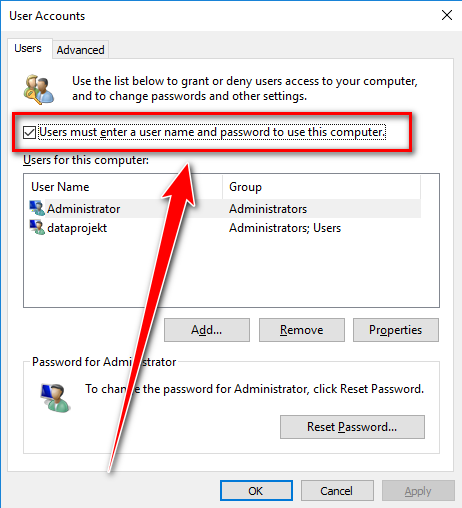
After applying this change and rebooting the server it managed to successfully auto-login to the account I had provided.
Option: Autologon
https://docs.microsoft.com/en-us/sysinternals/downloads/autologon
https://docs.microsoft.com/en-us/windows/win32/secauthn/protecting-the-automatic-logon-password
Autologon v3.10
By Mark Russinovich
Published: August 29, 2016
 Download Autologon (495 KB)
Run now from Sysinternals Live.
Introduction
Autologon enables you to easily configure Windows’ built-in autologon mechanism. Instead of waiting for a user to enter their name and password, Windows uses the credentials you enter with Autologon, which are encrypted in the Registry, to log on the specified user automatically.
[!WARNING] Although the password is encrypted in the registry as an LSA secret, a user with administrative rights can easily retrieve and decrypt it. (For more information see Protecting the Automatic Logon Password )
Autologon is easy enough to use. Just run autologon.exe, fill in the dialog, and hit Enable. The next time the system starts, Windows will try to use the entered credentials to log on the user at the console. Note that Autologon does not verify the submitted credentials, nor does it verify that the specified user account is allowed to log on to the computer.
To turn off auto-logon, hit Disable. Also, if the shift key is held down before the system performs an autologon, the autologon will be disabled for that logon. You can also pass the username, domain and password as command-line arguments:
autologon user domain password
Note: When Exchange Activesync password restrictions are in place, Windows will not process the autologon configuration.
Download Autologon (495 KB)
Run now from Sysinternals Live.
#include <windows.h>
#include <stdio.h>

DWORD UpdateDefaultPassword(WCHAR * pwszSecret)
{

    LSA_OBJECT_ATTRIBUTES ObjectAttributes;
    LSA_HANDLE LsaPolicyHandle = NULL;

    LSA_UNICODE_STRING lusSecretName;
    LSA_UNICODE_STRING lusSecretData;
    USHORT SecretNameLength;
    USHORT SecretDataLength;

    NTSTATUS ntsResult = STATUS_SUCCESS;
    DWORD dwRetCode = ERROR_SUCCESS;

    //  Object attributes are reserved, so initialize to zeros.
    ZeroMemory(&ObjectAttributes, sizeof(ObjectAttributes));

    //  Get a handle to the Policy object.
    ntsResult = LsaOpenPolicy(
        NULL,    // local machine
        &ObjectAttributes,
        POLICY_CREATE_SECRET,
        &LsaPolicyHandle);

    if( STATUS_SUCCESS != ntsResult )
    {
        //  An error occurred. Display it as a win32 error code.
        dwRetCode = LsaNtStatusToWinError(ntsResult);
        wprintf(L"Failed call to LsaOpenPolicy %lu\n", dwRetCode);
        return dwRetCode;
    }

    //  Initialize an LSA_UNICODE_STRING for the name of the
    //  private data ("DefaultPassword").
    SecretNameLength = (USHORT)wcslen(L"DefaultPassword");
    lusSecretName.Buffer = L"DefaultPassword";
    lusSecretName.Length = SecretNameLength * sizeof(WCHAR);
    lusSecretName.MaximumLength =
        (SecretNameLength+1) * sizeof(WCHAR);

    //  If the pwszSecret parameter is NULL, then clear the secret.
    if( NULL == pwszSecret )
    {
        wprintf(L"Clearing the secret...\n");
        ntsResult = LsaStorePrivateData(
            LsaPolicyHandle,
            &lusSecretName,
            NULL);
        dwRetCode = LsaNtStatusToWinError(ntsResult);
    }
    else
    {
        wprintf(L"Setting the secret...\n");
        //  Initialize an LSA_UNICODE_STRING for the value
        //  of the private data.
        SecretDataLength = (USHORT)wcslen(pwszSecret);
        lusSecretData.Buffer = pwszSecret;
        lusSecretData.Length = SecretDataLength * sizeof(WCHAR);
        lusSecretData.MaximumLength =
            (SecretDataLength+1) * sizeof(WCHAR);
        ntsResult = LsaStorePrivateData(
            LsaPolicyHandle,
            &lusSecretName,
            &lusSecretData);
        dwRetCode = LsaNtStatusToWinError(ntsResult);
    }

    LsaClose(LsaPolicyHandle);

    if (dwRetCode != ERROR_SUCCESS)
        wprintf(L"Failed call to LsaStorePrivateData %lu\n",
            dwRetCode);

    return dwRetCode;

}
What to do if you fail to install a new EA Infoport version and need to run the original version
If EA Infoport fails to start after updating to a new version, it can be caused by two reasons. The problem may have occurred during the update itself, for example because not all the necessary files were copied, disk space ran out, or the InfoportLauncher program terminated prematurely (or for other reasons).
The second group of problems can be a situation where the installation itself succeeded, but the new version of Infoport has a bug that prevents it from running correctly.
A quick solution to both types of problems is to revert to the original version, which was working on the server until the update.
The easiest way to do this is to modify the configuration (parameters) of the InfoportLauncher program. The standard setting for the "-Version" parameter is the string "* * * *". This means that the program tries to obtain and install the latest version of Infoport, without any restriction (applies both to installation from ftp and file).
It is also necessary to delete the file with the new version that is not functional.
If we replace the asterisks with a specific (still functional) version, InfoportLauncher will not attempt to update, but will run the specific version.
Automated permission setup for a user or group via DB
Question
How to automate the setting of permissions for a user or group, via DB?
Answer
EaInfoport has two tables for personal permissions (user and group). For users, the table is called `package_access_user` and for groups `package_access_group`.
I will describe the procedure for groups here, because we primarily recommend setting permissions for groups, but the procedure for users is similar.
For writing to this table, 4 values are important to us: Group ID, Repository ID, Package GUID (of the package), Permission ID.
We can get the group ID, for example, based on the group name:
SELECT g.Id
FROM AspNetGroups g
WHERE g.Name = 'Group name';
We can get the repository ID, for example, based on the repository name:
SELECT r.Id
FROM Repositories r
WHERE r.Name = 'Repository name';
List of permission IDs for each type:
- Owner has ID 1
- Read has ID 5
- Edit has ID 6
- Review has ID 8
- Delete has ID 10
Attention! The package GUID must be located in our selected repository!
Insert script that writes Read permission for the group 'Group name' in the repository 'Repository name' on the package with GUID '{00GUID00-0000-0000-0000-000PACKAGE00}'. We ignore the Access column, setting it to 0.
INSERT INTO `infoport`.`package_access_group` (`GroupId`, `Access`, `RepositoryId`, `Package`, `RelationTypeId`) VALUES (
  (SELECT g.Id
	FROM AspNetGroups g
	WHERE g.Name = 'Group name'),
  0,
  (SELECT r.Id
	FROM Repositories r
	WHERE r.Name = 'Repository name'),
  '{00GUID00-0000-0000-0000-000PACKAGE00}', '5');
For users, the procedure will be the same, but we will write to the `package_access_user` table and select the user ID from the AspNetUsers table.
Default permissions can be found in the `package_acess` table. Important are the columns Package, RepositoryId, DefaultReadAllowed.
- Package contains the GUID of the package
- RepositoryId contains the number of the repository in which the package is located
- DefaultReadAllowed is the column for default reading. 1 means reading is allowed. 0 means reading is denied. Null means reading is inherited from the Parent.
Roots must have a default set for DefaultReadAllowed! They must not contain Null!

The scripts are made for MySQL.
I will also describe the evaluation logic here, so that there is no confusion.
Personal permissions always apply a negation to the set default permission!
Let's look at this simple example. Package 1 has two sub-packages, 2 and 3.
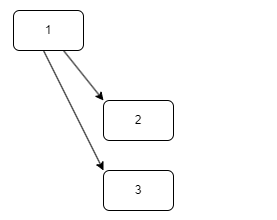
If we have default read enabled set on package 1, and we run an INSERT of a personal read permission on package 2, EaInfoport will calculate a denial for the given group/user on package 2.
Furthermore, if we have default read disabled set on package 3 and we run an INSERT of a personal read permission, EaInfoport will calculate read access for the given group/user on package 3.
Note: In case of direct interventions in the EaInfoport database, a restart of EaInfoport is required!!!
HTTP header size limit setting
at the very bottom
How do all three options for generating "Url for access ..." differ
Url for the direct acces
The function returns a URL to the user which contains the repository id, diagram guid and an access key. Using this URL, it is possible (for anyone who knows it) to display the diagram in the Infoport program in the same way the diagram would be seen by the author of the link. The key contained in the URL is actually an authorization token and replaces the need to log in to Infoport.
- The function does not write to any directory and does not subsequently need any file on disk
- It writes to a table (and then subsequently uses it)
- detail_authorize_key
Url for public diagram
It is used to publish the diagram so that it is accessible to anyone who knows the generated URL. It is a direct link to the directory with diagram images. It is not access to Infoport as such, but only to the directory with generated diagrams.
http://localhost/access/4/3FA89587-2763-4c14-9C98-D3A4E8D741AB.png
- The function writes to directories (and then it also needs to display diagrams from the first one mentioned)
- /wwwroot/access/[repoid]/
- /wwwroot/archive/[repoid]/
Whereas /archive/ is not essential for functionality
It also writes to a database table. This table is subsequently needed to verify whether this diagram is really public and accessible to everyone. This check prevents the possibility of displaying the diagram just by knowing its guid (and constructing your own URL)
- detail_diagram_key
Image for the direct access
The function combines the previous two, allowing public access to the diagram image (file from disk), with the option to click through to Infoport and display the diagram and its associated information. This click-through is bound to a valid key. The reason for implementing this function is the requirement to display a "preview" of the diagram (which is sufficient in many cases) but with the option to click through to the Infoport environment for further details and information.

- The function writes to the same directories as the second function
- /wwwroot/access/[repoid]/
- /wwwroot/archive/[repoid]/
- and to both tables used by the previous functions
- detail_authorize_key
- detail_diagram_key
Does the "KeyCloak" configuration section in appsettings.json support multiple redirect URLs?
Yes. Note: the name of the section “KeyCloak” is somewhat misleading – it is actually a generic OpenID Connect login configuration, which can be used not only with Keycloak, but also with other identity providers, e.g. Azure AD / Microsoft Entra ID. The “RedirectUri” value can be specified as a list of URLs separated by a semicolon (“;”), e.g.:
Code
{ "KeyCloak": { "RedirectUri": "https://app1.example.com/signin-oidc;https://app2.example.com/signin-oidc" } }Question: How does the application choose the correct URL if several are specified? When redirecting to the identity provider (Keycloak, Azure AD, etc.), the application compares the domain (host) of the current request with the domain of each URL in the list and uses the one whose host matches.
Question: What happens if the current domain does not match any of the allowed URLs? The application throws an exception stating that the given host does not have an allowed redirect in the KeyCloak/RedirectUri section of appsettings.json. The login will not proceed until the administrator adds the domain to the list.
Question: Do I also need to register this address with the identity provider itself? Yes. All redirect URLs listed in appsettings.json must also be registered as allowed redirect URIs directly in the client configuration of the respective identity provider (Keycloak, Azure AD, etc.), otherwise the login will be rejected regardless of the application’s settings.
Question: What happens if only one URL is specified? If there is only one address in the configuration, it is always used directly, without comparing the domain.
If the following message appears after starting Infoport ...
"An error occurred while seeding the database"
or
"Database schema is not empty!!! Create empty database schema for Infoport."
..........and if you are running the portal on PostgreSQL, you can find the instructions here.