# Permissions on the package


# Permissions to parts of the repository

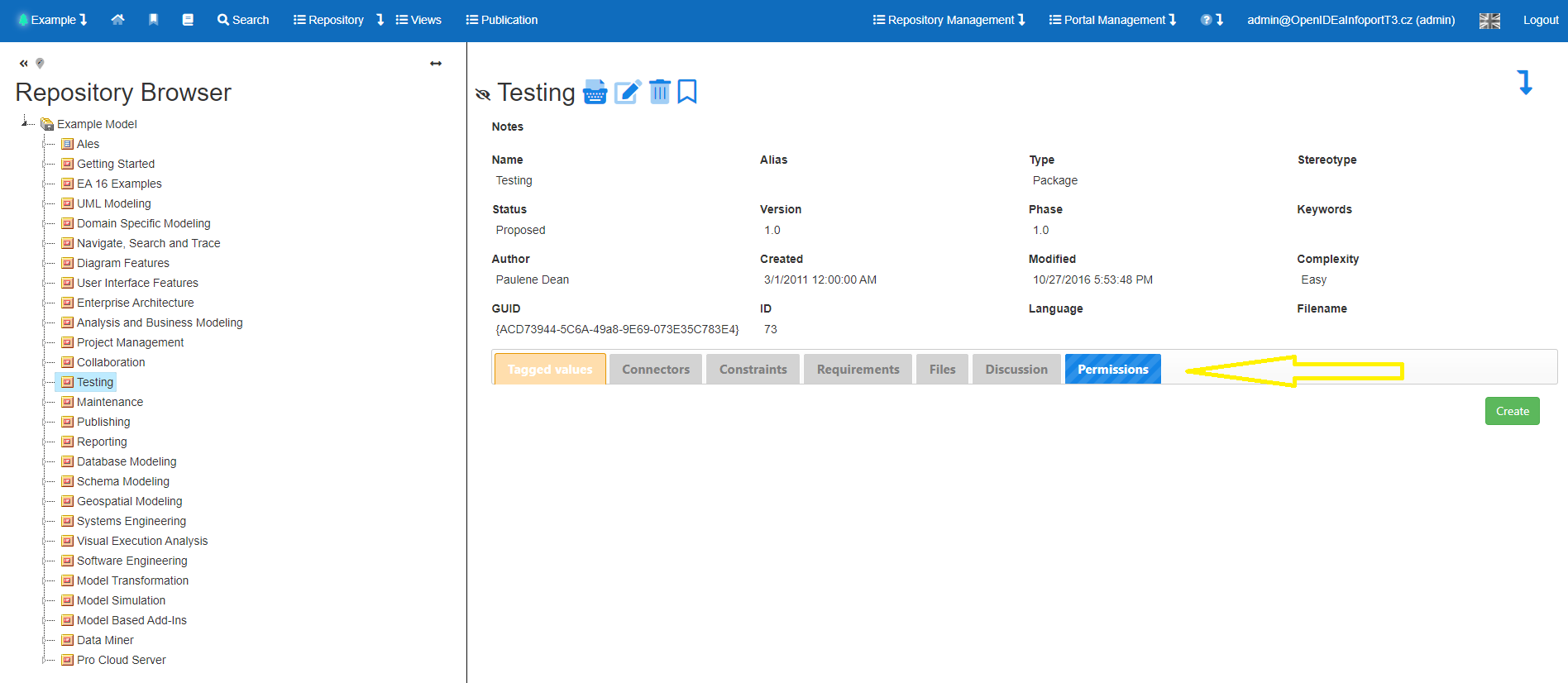
EA Information Portal supports a permission system at the package level (repository browser tree branches), both for reading and (since version 7.5) for writing.

It is therefore possible to restrict the reading of parts of the model to specific groups or users. This functionality is not available in Enterprise Architect itself.

It is therefore possible to restrict access of certain users to (for example) specific projects, sensitive processes, risk analyses, strategic business models, etc.

This feature fundamentally supports the effort to have all models in one repository.

Permissions can be set for groups and users.

Permissions are applied hierarchically from the package they are set on down.

[![Snímek obrazovky 2024-06-10 123435.png](https://doc.eainfoport.cz/uploads/images/gallery/2024-06/scaled-1680-/HQ3snimek-obrazovky-2024-06-10-123435.png)](https://doc.eainfoport.cz/uploads/images/gallery/2024-06/HQ3snimek-obrazovky-2024-06-10-123435.png)
# Default settings

EA Infoport supports a permission system at the package level (repository browser tree branches), both for reading and (since version 7.5) for writing.

Thus, it is possible to restrict the reading of parts of the model to certain groups or users.

It is thus possible to restrict access of certain users to (for example) specific projects, sensitive processes, risk analyses, strategic business models, etc.

If there is no default setting, i.e. the setting is taken from the parent root package, then the repository is not visible by default, or reading is not allowed.

Permissions can be set for groups and users, via the "Permissions" button.

The rights are applied hierarchically from the package on which they are set downwards.  
   
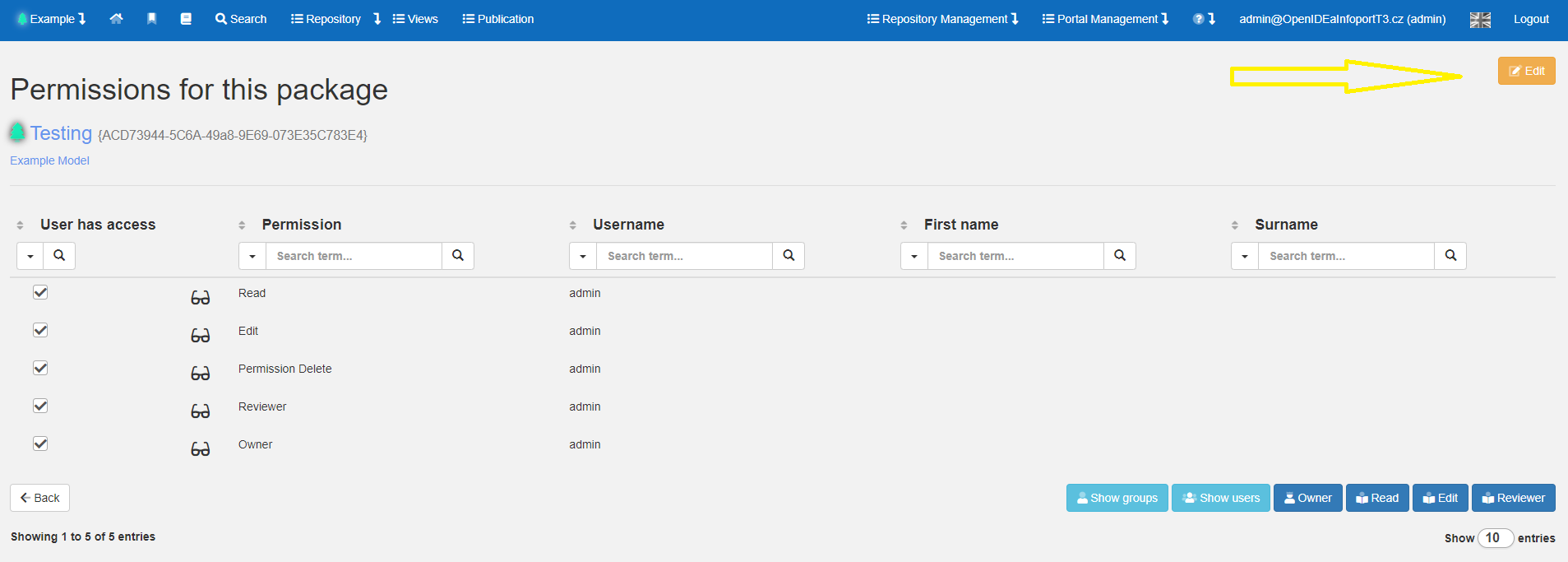
EA Infoport allows you to disable/allow users or groups from accessing different packages by default using the following button:

[![Snímek obrazovky 2024-06-10 124429.png](https://doc.eainfoport.cz/uploads/images/gallery/2024-06/scaled-1680-/snimek-obrazovky-2024-06-10-124429.png)](https://doc.eainfoport.cz/uploads/images/gallery/2024-06/snimek-obrazovky-2024-06-10-124429.png)
[![Snímek obrazovky 2024-06-10 124659.png](https://doc.eainfoport.cz/uploads/images/gallery/2024-06/scaled-1680-/snimek-obrazovky-2024-06-10-124659.png)](https://doc.eainfoport.cz/uploads/images/gallery/2024-06/snimek-obrazovky-2024-06-10-124659.png)
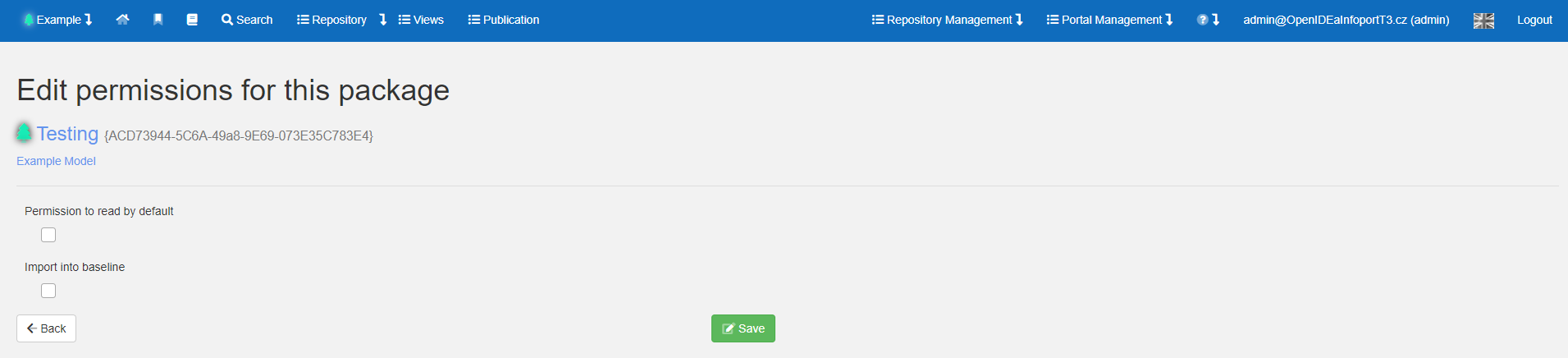
Without default settings

[![Snímek obrazovky 2024-06-10 124907.png](https://doc.eainfoport.cz/uploads/images/gallery/2024-06/scaled-1680-/snimek-obrazovky-2024-06-10-124907.png)](https://doc.eainfoport.cz/uploads/images/gallery/2024-06/snimek-obrazovky-2024-06-10-124907.png)
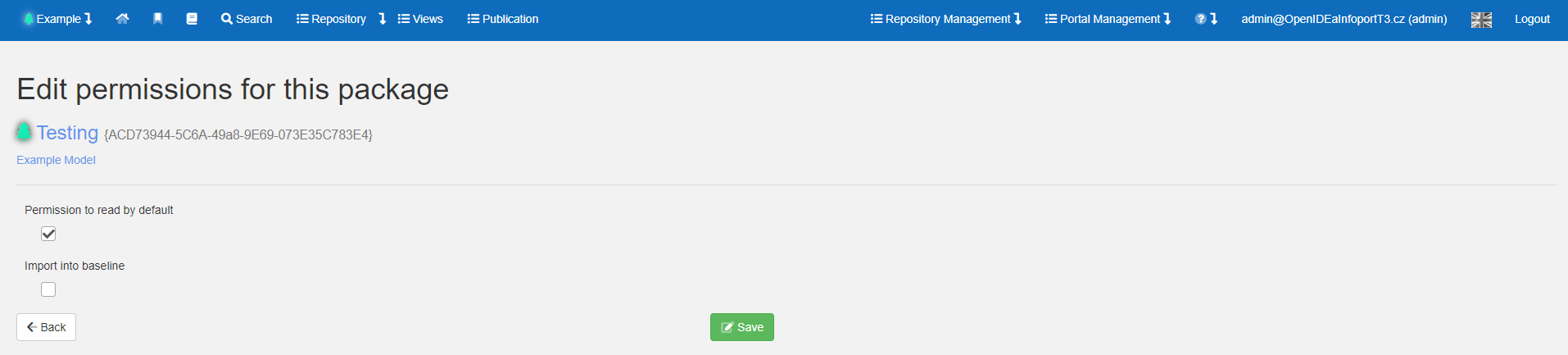
Reading is enabled by default

[![Snímek obrazovky 2024-06-10 124942.png](https://doc.eainfoport.cz/uploads/images/gallery/2024-06/scaled-1680-/snimek-obrazovky-2024-06-10-124942.png)](https://doc.eainfoport.cz/uploads/images/gallery/2024-06/snimek-obrazovky-2024-06-10-124942.png)
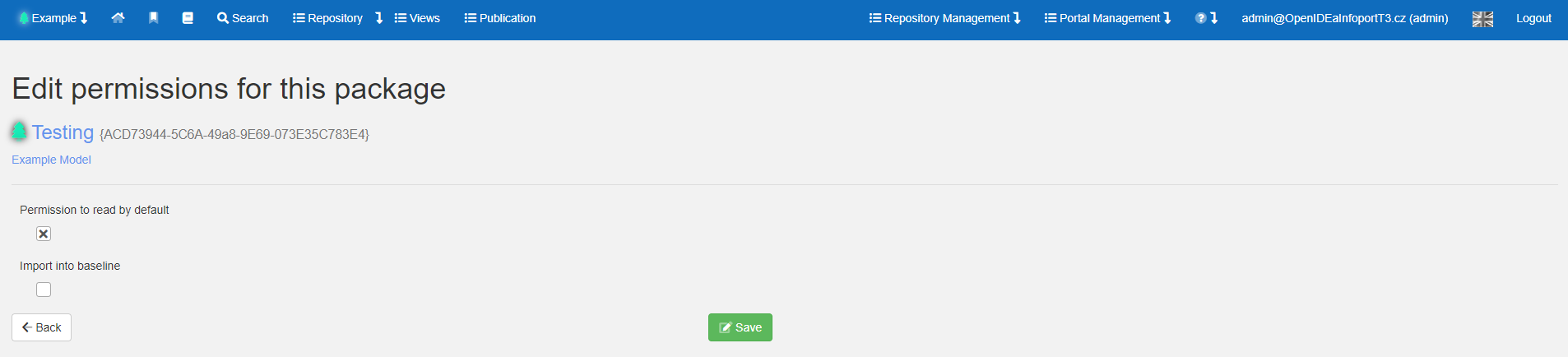
Reading is disabled by default

# User/group role specifications

If the default settings are not enough and we need to specify a range of other users, it is possible to specify roles and access directly on the user or group.

[![image-1718017019530.png](https://doc.eainfoport.cz/uploads/images/gallery/2024-06/scaled-1680-/image-1718017019530.png)](https://doc.eainfoport.cz/uploads/images/gallery/2024-06/image-1718017019530.png)
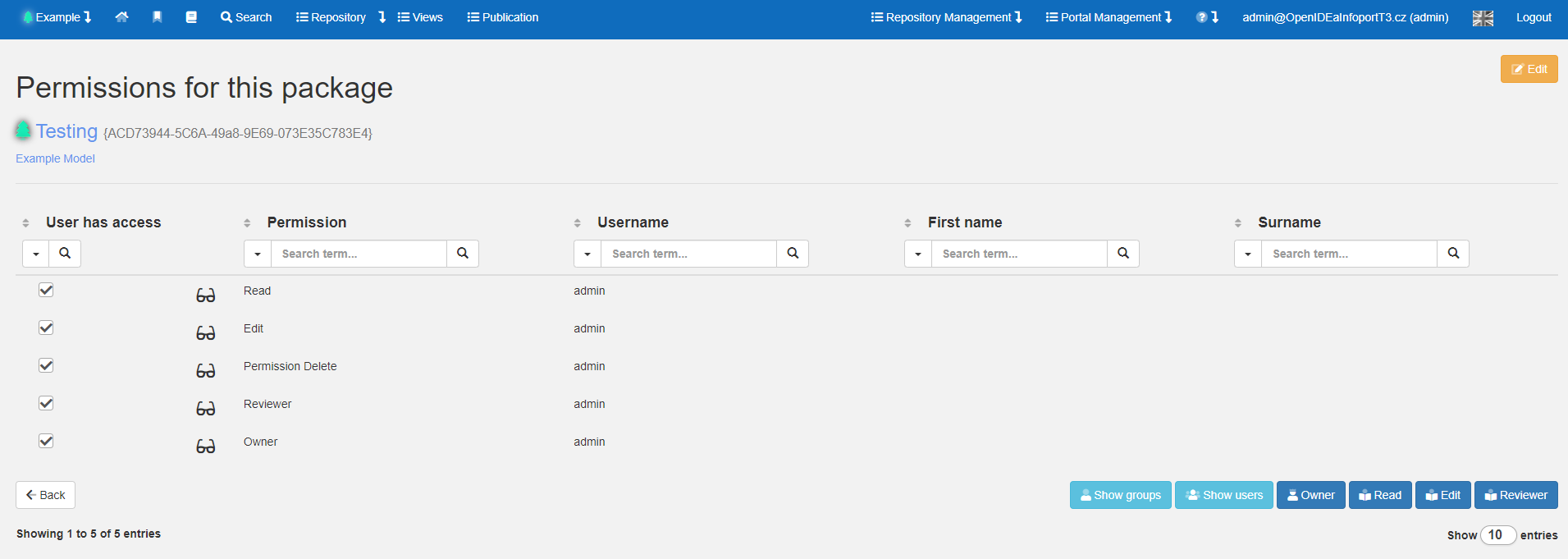
The table below shows the legality of the powers:

<table class=" align-center" id="bkmrk-role-%C4%8Dten%C3%AD-editace-s" width="420"><tbody><tr><td class="align-left" width="127">Role

</td><td class="align-left" width="73">read

</td><td class="align-left" width="73">edit

</td><td class="align-left" width="73">delete

</td><td class="align-left" width="73">reviewed

</td></tr><tr><td class="align-left" width="127">Reader

</td><td class="align-left" width="73">✔

</td><td class="align-left" width="73">x

</td><td class="align-left" width="73">x

</td><td class="align-left" width="73">x

</td></tr><tr><td class="align-left" width="127">Editor

</td><td class="align-left" width="73">✔

</td><td class="align-left" width="73">✔

</td><td class="align-left" width="73">x

</td><td class="align-left" width="73">✔

</td></tr><tr><td class="align-left" width="127">Permission Delete

</td><td class="align-left" width="73">✔

</td><td class="align-left" width="73">x

</td><td class="align-left" width="73">✔

</td><td class="align-left" width="73">x

</td></tr><tr><td class="align-left" width="127">Reviewer

</td><td class="align-left" width="73">✔

</td><td class="align-left" width="73">x

</td><td class="align-left" width="73">x

</td><td class="align-left" width="73">✔

</td></tr><tr><td class="align-left" width="127">Owner

</td><td class="align-left" width="73">✔

</td><td class="align-left" width="73">✔

</td><td class="align-left" width="73">✔

</td><td class="align-left" width="73">✔

</td></tr></tbody></table>

# Owner

The EA Information Portal supports a package-level permission system (repository browser tree branches), both read and (as of version 7.5) write.

It is therefore possible to restrict the reading of parts of the model to specific groups or users. This functionality is not available in Enterprise Architect itself.

It is therefore possible to restrict access of certain users to (for example) specific projects, sensitive processes, risk analyses, strategic business models, etc.

The rights are applied hierarchically from the package on which they are set downwards.

In this context, a new role is introduced in EA Infoport - the owner of a process part. This role will be able to assign read, write (and other) rights to the parts of the model it owns (tree branches). The owner can be users or groups. This role is introduced so that the repository administrator (admin) does not have to set all read and write permissions.

Example of use

- Restricting access of external contractors working on a common project. Everyone can only see what they are allowed to see.
- In case of termination of cooperation with a contractor, it is sufficient to terminate access through the EA Information Portal.

[![Snímek obrazovky 2024-06-10 123435.png](https://doc.eainfoport.cz/uploads/images/gallery/2024-06/scaled-1680-/HQ3snimek-obrazovky-2024-06-10-123435.png)](https://doc.eainfoport.cz/uploads/images/gallery/2024-06/HQ3snimek-obrazovky-2024-06-10-123435.png)

Permissions on the package

[![image-1718017019530.png](https://doc.eainfoport.cz/uploads/images/gallery/2024-06/scaled-1680-/image-1718017019530.png)](https://doc.eainfoport.cz/uploads/images/gallery/2024-06/image-1718017019530.png)

# Setting permissions on package

The permission settings on package are shown in the table below:

<table id="bkmrk-parent-default-group" width="790"><tbody><tr><td width="158">Parent</td><td width="158">Default</td><td width="158">Group</td><td width="158">Personal</td><td width="158">Result</td></tr><tr><td>no</td><td>-</td><td>-</td><td>-</td><td>no</td></tr><tr><td>no</td><td>no</td><td>-</td><td>-</td><td>no</td></tr><tr><td>no</td><td>yes</td><td>-</td><td>-</td><td>yes</td></tr><tr><td>no</td><td>x</td><td>-</td><td>no</td><td>no</td></tr><tr><td>no</td><td>x</td><td>-</td><td>yes</td><td>yes</td></tr><tr><td>no</td><td>x</td><td>no</td><td>-</td><td>no</td></tr><tr><td>no</td><td>x</td><td>yes</td><td>-</td><td>yes</td></tr><tr><td>no</td><td>x</td><td>no</td><td>no</td><td>no</td></tr><tr><td>no</td><td>x</td><td>no</td><td>yes</td><td>yes</td></tr><tr><td>no</td><td>x</td><td>yes</td><td>no (not possible)\*\*</td><td>yes</td></tr><tr><td>no</td><td>x</td><td>yes</td><td>yes</td><td>yes</td></tr><tr><td>yes</td><td>-</td><td>-</td><td>-</td><td>yes</td></tr><tr><td>yes</td><td>no</td><td>-</td><td>-</td><td>no</td></tr><tr><td>yes</td><td>yes</td><td>-</td><td>-</td><td>yes</td></tr><tr><td>yes</td><td>x</td><td>-</td><td>no</td><td>no</td></tr><tr><td>yes</td><td>x</td><td>-</td><td>yes</td><td>yes</td></tr><tr><td>yes</td><td>x</td><td>no</td><td>-</td><td>no</td></tr><tr><td>yes</td><td>x</td><td>yes</td><td>-</td><td>yes</td></tr><tr><td>yes</td><td>x</td><td>no</td><td>no</td><td>no</td></tr><tr><td>yes</td><td>x</td><td>no</td><td>ano (not possible)\*\*</td><td>no</td></tr><tr><td>yes</td><td>x</td><td>yes</td><td>no</td><td>no</td></tr><tr><td>yes</td><td>x</td><td>yes</td><td>yes</td><td>yes</td></tr></tbody></table>

\* If you set permissions on a group, the settings are automatically checked on the user who is a member of the group.   
\- not specified   
x value does not matter

<div class="pointer-container" id="bkmrk-%C2%A0"><div class="pointer anim is-page-editable"><svg class="svg-icon" data-icon="link" role="presentation" viewbox="0 0 24 24" xmlns="http://www.w3.org/2000/svg"></svg><div class="input-group inline block"><input id="bkmrk-" placeholder="url" readonly="readonly" type="text"></input> <button class="button outline icon" data-clipboard-target="#pointer-url" title="Kopírovat odkaz" type="button"><svg class="svg-icon" data-icon="copy" role="presentation" viewbox="0 0 24 24" xmlns="http://www.w3.org/2000/svg"></svg></button></div><svg class="svg-icon" data-icon="edit" role="presentation" viewbox="0 0 24 24" xmlns="http://www.w3.org/2000/svg"></svg></div></div>   
If there is no default setting i.e. the setting is taken from the parent root package, the repository is not visible by default, or reading is not allowed.

# Authorization if the user is a member of two groups with different permissions

**Authorization if the user is a member of two groups with different permissions**

<table id="bkmrk-package%C2%A0-default-gro" style="width: 621px; height: 378px;" width="408"><tbody><tr><td style="width: 154.965px;">**Package default**</td><td style="width: 149.878px;">**Group A - Manager**</td><td style="width: 146.406px;">**Group B - basic**</td><td style="width: 143.958px;">**Result**</td></tr><tr><td style="width: 161.389px;">Without settings\*</td><td style="width: 156.076px;">Without settings\*</td><td style="width: 152.465px;">Without settings\*</td><td style="width: 149.948px;">Disabled</td></tr><tr><td style="width: 161.389px;">Enabled</td><td style="width: 156.076px;">Without settings\*</td><td style="width: 152.465px;">Without settings\*</td><td style="width: 149.948px;">Enabled</td></tr><tr><td style="width: 161.389px;">Disabled</td><td style="width: 156.076px;">Without settings\*</td><td style="width: 152.465px;">Without settings\*</td><td style="width: 149.948px;">Disabled</td></tr><tr><td style="width: 161.389px;">Enabled</td><td style="width: 156.076px;">Enabled</td><td style="width: 152.465px;">Enabled</td><td style="width: 149.948px;">Enabled</td></tr><tr><td style="width: 161.389px;">Disabled</td><td style="width: 156.076px;">Disabled</td><td style="width: 152.465px;">Disabled</td><td style="width: 149.948px;">Disabled</td></tr><tr><td style="width: 161.389px;"><span style="color: #ba372a; background-color: #fbeeb8;">Enabled</span></td><td style="width: 156.076px;"><span style="color: #ba372a; background-color: #fbeeb8;">Enabled</span></td><td style="width: 152.465px;"><span style="color: #ba372a; background-color: #fbeeb8;">Disabled</span></td><td style="width: 149.948px;"><span style="color: #ba372a; background-color: #fbeeb8;">Disabled</span></td></tr><tr><td style="width: 161.389px;"><span style="color: #ba372a; background-color: #fbeeb8;">Disabled</span></td><td style="width: 156.076px;"><span style="color: #ba372a; background-color: #fbeeb8;">Enabled</span></td><td style="width: 152.465px;"><span style="color: #ba372a; background-color: #fbeeb8;">Disabled</span></td><td style="width: 149.948px;"><span style="color: #ba372a; background-color: #fbeeb8;">Disabled</span></td></tr></tbody></table>

\*only for new "root" in other cases the settings are inherited from a higher package

**Correction if the user is a member of two groups with different permissions and also has individual settings**

<table id="bkmrk-package%C2%A0-default-gro-0" style="height: 340px; width: 992px;" width="847"><tbody><tr style="height: 46.6667px;"><td style="width: 154.948px;">**Package default**</td><td style="width: 149.861px;">**Group A - Manager**</td><td style="width: 146.389px;">**Group B - basic**</td><td style="width: 143.941px;">**Result**</td><td style="width: 147.969px; height: 46.6667px;">**Individual settings**</td><td style="width: 148.021px; height: 46.6667px;">**Result**</td></tr><tr style="height: 29.8785px;"><td style="width: 154.948px; height: 29.8785px;">Without settings\*</td><td style="width: 149.861px; height: 29.8785px;">Without settings\*</td><td style="width: 146.389px; height: 29.8785px;">Without settings\*</td><td style="width: 143.941px; height: 29.8785px;">Disabled</td><td style="width: 147.969px; height: 29.8785px;">Enabled</td><td style="width: 148.021px; height: 29.8785px;">Enabled</td></tr><tr style="height: 29.8785px;"><td style="width: 154.948px; height: 29.8785px;">Enabled</td><td style="width: 149.861px; height: 29.8785px;">Without settings\*</td><td style="width: 146.389px; height: 29.8785px;">Without settings\*</td><td style="width: 143.941px; height: 29.8785px;">Enabled</td><td style="width: 147.969px; height: 29.8785px;">Disabled</td><td style="width: 148.021px; height: 29.8785px;">Disabled</td></tr><tr style="height: 29.8785px;"><td style="width: 154.948px; height: 29.8785px;">Disabled</td><td style="width: 149.861px; height: 29.8785px;">Without settings\*</td><td style="width: 146.389px; height: 29.8785px;">Without settings\*</td><td style="width: 143.941px; height: 29.8785px;">Disabled</td><td style="width: 147.969px; height: 29.8785px;">Enabled</td><td style="width: 148.021px; height: 29.8785px;">Enabled</td></tr><tr style="height: 29.8785px;"><td style="width: 154.948px; height: 29.8785px;">Enabled</td><td style="width: 149.861px; height: 29.8785px;">Enabled</td><td style="width: 146.389px; height: 29.8785px;">Enabled</td><td style="width: 143.941px; height: 29.8785px;">Enabled</td><td style="width: 147.969px; height: 29.8785px;">Disabled</td><td style="width: 148.021px; height: 29.8785px;">Disabled</td></tr><tr style="height: 29.8785px;"><td style="width: 154.948px; height: 29.8785px;">Disabled</td><td style="width: 149.861px; height: 29.8785px;">Disabled</td><td style="width: 146.389px; height: 29.8785px;">Disabled</td><td style="width: 143.941px; height: 29.8785px;">Disabled</td><td style="width: 147.969px; height: 29.8785px;">Enabled</td><td style="width: 148.021px; height: 29.8785px;">Enabled</td></tr><tr style="height: 29.8785px;"><td style="width: 154.948px; height: 29.8785px;"><span style="color: #ba372a; background-color: #fbeeb8;">Enabled</span></td><td style="width: 149.861px; height: 29.8785px;"><span style="color: #ba372a; background-color: #fbeeb8;">Enabled</span></td><td style="width: 146.389px; height: 29.8785px;"><span style="color: #ba372a; background-color: #fbeeb8;">Disabled</span></td><td style="width: 143.941px; height: 29.8785px;"><span style="color: #ba372a; background-color: #fbeeb8;">Disabled</span></td><td style="width: 147.969px; height: 29.8785px;"><span style="color: #ba372a; background-color: #fbeeb8;">cannot be allowed\*\*</span></td><td style="width: 148.021px; height: 29.8785px;"><span style="color: #ba372a; background-color: #fbeeb8;">Disabled</span></td></tr><tr style="height: 29.8785px;"><td style="width: 154.948px; height: 29.8785px;"><span style="color: #ba372a; background-color: #fbeeb8;">Disabled</span></td><td style="width: 149.861px; height: 29.8785px;"><span style="color: #ba372a; background-color: #fbeeb8;">Enabled</span></td><td style="width: 146.389px; height: 29.8785px;"><span style="color: #ba372a; background-color: #fbeeb8;">Disabled</span></td><td style="width: 143.941px; height: 29.8785px;"><span style="color: #ba372a; background-color: #fbeeb8;">Disabled</span></td><td style="width: 147.969px; height: 29.8785px;"><span style="color: #ba372a; background-color: #fbeeb8;">cannot be allowed\*\*</span></td><td style="width: 148.021px; height: 29.8785px;"><span style="color: #ba372a; background-color: #fbeeb8;">Enabled</span></td></tr></tbody></table>

\*\* the message successfully removed/added but settings are not saved, group settings cannot be overridden

